My Virtual Teammate
Client Playbook
We’re thrilled you’ve choosen use to help you streamline your workflow and enhance your productivity. Our Client Playbook is designed to be your go-to
Welcome to the Team
You’re spending half your day on emails, scheduling meetings, and organizing files, yet the work keeps piling up.
It’s time to bring on a Virtual Teammate (VT). These skilled professionals handle a wide range of tasks remotely, freeing you to focus on what really matters—growing your business.
A VT works from their own location, providing flexible and efficient support tailored to your needs. They take care of the details, so you can focus on strategic, high-priority activities.
Hiring a VT means more productivity, better time management, and cost savings—all without the overhead of full-time staff. But to truly benefit, you need to manage your VT effectively, ensuring they streamline your workflow and reduce chaos, not add to it.

We get it – working with someone in another country can feel like trying to hit a home run with the bases split between two stadiums. But the truth is, if you have a true team, borders and timezones don’t matter. That’s because teamwork comes from a state of aligned values. At Virtual Teammate, we know that a teammate is more than just someone who shares your office space. It’s a mindset, and our VTs have it down to a science.
While this playbook is packed with valuable resources, the number one piece of advice we can offer is this: remember, they are just like you. Just like you, our VTs are seasoned pros with years of experience under their belts. They have career ambitions, life goals, and yes, they’re also juggling that work-life balance. They may not share the same zip code, but they share your drive, your dedication, and your determination to get the job done right.
Here are 10 helpful mindsets to keep in mind as you embark on this journey together:
Team Spirit First: Remember, you and your VT are working toward the same goals. Approach every task with a sense of shared purpose.
Unified Communication: Keep communication open and clear to ensure you’re both on the same page, no matter where you’re located.
Celebrate Team Wins: Recognize that every success is a team success, whether it’s big or small.
Support Each Other: Just like any great team, you should support your VT, and they’ll support you right back.
Collaborate Actively: Engage in active collaboration, knowing that two heads (or more) are better than one.
Trust in Your Teammate: Trust that your VT is as invested in the success of the project as you are.
Stay Aligned: Regularly check in on shared goals to ensure you’re both moving in the same direction.
Foster Mutual Respect: Respect the expertise and contributions of your VT, just as they respect yours.
Keep the Team Bond Strong: Even across distances, find ways to build rapport and strengthen the team bond.
Think of the Big Picture: Always remember that you’re part of something bigger—a team working together to achieve great things.

“You don’t rise to the level of your goals; you fall to the level of your systems.” – James Clear
The VT Playbook is your go-to guide for maximizing the productivity of your Virtual Teammates. Packed with strategies, tips, and best practices, this playbook helps you master the art of remote collaboration. From task delegation to communication methods, it’s all about setting up a successful, efficient working relationship with your VT.
Why does the VT Playbook matter? Because it’s designed to optimize your remote partnerships. This isn’t just a set of instructions—it’s a roadmap to unlocking the full potential of VT support.
By diving into the playbook, you’ll discover proven methods and tools that streamline your workflow and enhance collaboration. It’s your reference for bridging the geographical gap, minimizing misunderstandings, and keeping productivity on point.
And remember, this playbook isn’t static—it evolves with the ever-changing landscape of remote work. Whether you’re a busy business owner or an entrepreneur looking to boost efficiency, the VT Playbook is an essential resource that empowers you to harness the power of remote support and take your operations to the next level.Simply put, life gets a whole lot easier when you have a Virtual Teammate—and even more so with a Virtual Teammate Playbook in hand. The playbook lays out clear roles for both you and your VT, providing step-by-step processes for various tasks. When unexpected situations arise, it’s your go-to guide for handling emergencies with confidence.
A well-structured VT Playbook ensures your Virtual Teammate has crystal-clear instructions, reducing the chances of misunderstandings and errors. This leads to more efficient task completion, better communication, and a stronger, more successful working relationship between you and your VT.
You’ve probably already picked your first Virtual Teammate, but if you haven’t—or if you’re thinking about adding another—it’s simple. You can expand your Virtual Teammate team anytime by reaching out to your account manager or browsing our talent pool. We’re here to make growing your team easy and seamless.
Once you’ve selected your dedicated Virtual Teammate (VT), you are immediately assigned a dedicated Client Success Manager (CSM) who will guide you every step of the way.
Our onboarding process is structured, strategic, and designed to ensure your VT creates impact quickly.
Before your VT officially begins, we conduct a comprehensive Kick-Off Meeting to align expectations and build a clear execution plan.
During this session, we will cover:
- ✅ Tools and software access
- ✅ Scope of responsibilities and priority tasks
- ✅ Training structure and transition plan
- ✅ Communication cadence and reporting
- ✅ KPIs and success metrics
- ✅ Timeline for ramp-up
- ✅ Risk prevention and clarity checkpoints
- ✅ Any questions or special considerations
This ensures there is no confusion, no guessing, and no wasted time.
We help you transition from delegation to integration.
Your CSM will:
- Monitor early performance
- Ensure training milestones are being met
- Provide feedback loops
- Support both you and your VT
- Help optimize workflows if needed
We don’t just “place” a VT, we build a performance partnership.
You are never alone in this process.
Your CSM remains actively involved through:
- Weekly check-ins
- Performance reviews
- KPI tracking guidance
- Scaling discussions
- Additional VT planning
Our goal is simple:
To make your Virtual Teammate one of the best strategic decisions you’ve made for your business.
Welcome to the Team
You’re spending half your day on emails, scheduling meetings, and organizing files, yet the work keeps piling up.
It’s time to bring on a Virtual Teammate (VT). These skilled professionals handle a wide range of tasks remotely, freeing you to focus on what really matters—growing your business.
A VT works from their own location, providing flexible and efficient support tailored to your needs. They take care of the details, so you can focus on strategic, high-priority activities.
Hiring a VT means more productivity, better time management, and cost savings—all without the overhead of full-time staff. But to truly benefit, you need to manage your VT effectively, ensuring they streamline your workflow and reduce chaos, not add to it.
Understanding the Client Value Journey with Virtual Teammate
Virtual Teammate is dedicated to providing a seamless and supportive experience for businesses looking to enhance their operations with skilled virtual assistants (VTs).
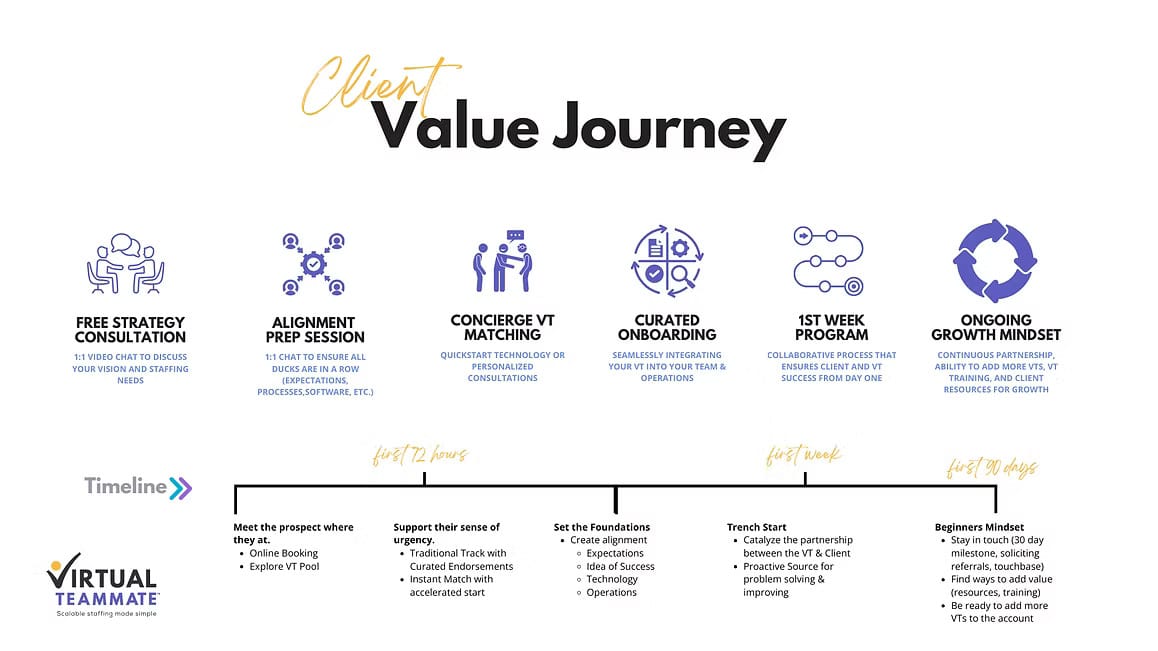
The Client Value Journey at Virtual Teammate is a comprehensive approach designed to ensure that every client receives the support they need to achieve their business goals. From the initial consultation to ongoing growth, each step is carefully crafted to provide maximum value and ensure a successful partnership.
The Client Value Journey is a step-by-step process that ensures clients receive tailored support and achieve their business goals efficiently and effectively. Here’s a breakdown of what to expect on this journey:
Free Strategy Consultation
The journey begins with a Free Strategy Consultation. During this one-on-one video chat, the focus is on understanding your vision and staffing needs. This initial conversation allows Virtual Teammate to gather insights into your business and ensure that your goals are clearly defined. Whether you’re looking to fill a specific role or need broader support, this consultation sets the foundation for a successful partnership.
Alignment Prep Session
Following the strategy consultation, the next step is the Alignment Prep Session. In this session, another one-on-one chat, the objective is to align expectations, processes, and software requirements. It’s crucial to have all the “ducks in a row” to avoid any hiccups during the onboarding process. This step ensures that both the client and the VT are on the same page, paving the way for a smooth and efficient working relationship.
Concierge VT Matching
Next, clients are introduced to Concierge VT Matching. This step is all about finding the right VT for your business. Whether you opt for the Quickstart Technology approach or prefer Personalized Consultations, Virtual Teammate offers tailored endorsements to match you with a VT who meets your specific needs. The matching process can be accelerated through the Instant Match feature, which caters to clients with an urgent need for virtual support.
Curated Onboarding
With the right VT selected, the journey continues with Curated Onboarding. This phase focuses on seamlessly integrating your VT into your team and operations. The onboarding process is customized to ensure that your VT is well-prepared to hit the ground running, minimizing any disruption to your business. The goal is to make the transition as smooth as possible, allowing your VT to start contributing effectively from day one.
1st Week Program
The first week with your VT is crucial, and Virtual Teammate’s 1st Week Program is designed to ensure success from the start. This program is a collaborative process where both the client and the VT work closely to establish a strong foundation. The focus is on setting clear expectations, aligning on technology and operations, and beginning to tackle the tasks at hand. This early collaboration helps to build a strong, productive relationship right from the beginning.
Ongoing Growth Mindset
Finally, the journey doesn’t end after the first week. Virtual Teammate embraces an Ongoing Growth Mindset, committed to continuous partnership and support. This phase includes the ability to add more VTs to your account as your business grows, VT training to keep skills sharp, and client resources that support ongoing success. The partnership is designed to evolve with your business, ensuring long-term value and growth.
Timeline Overview
First 72 Hours: The focus is on meeting the prospect where they are at, supporting their sense of urgency, and setting the foundations for success.
First Week: The partnership between the VT and client is catalyzed, with proactive problem-solving and improving operations.
First 90 Days: The client maintains a beginner’s mindset, staying in touch with Virtual Teammate, soliciting feedback, and continuously adding value through resources and training.
Too often, we spend time on low-ROI activities. These are necessary but low-value, routine tasks that don’t contribute to substantial growth or profit. By hiring a VA, you can delegate these types of tasks and concentrate on high-ROI activities, such as:
Strategic planning
Business development
Customer relations
Here’s a look at three more significant advantages of properly managing a VA:
Productivity isn’t just a buzzword—it’s the backbone of a thriving business.
As a leader, you know that every minute counts. Maximizing those minutes is key to staying ahead, and that’s exactly where a Virtual Teammate (VT) shines. Whether you’ve just welcomed your first VT or you’re thinking about expanding your team, it’s important to understand how a VT can be a game-changer for your productivity.
Hiring a Virtual Teammate is one of the smartest decisions you can make to supercharge your business productivity. With clear, effective communication, a broad skill set, and the flexibility to adapt to your needs, a VT can handle a wide range of tasks, freeing you up to focus on what matters most. Their professionalism and dedication ensure that your business runs smoothly, helping you achieve more in less time.
Clear, Effective Communication: The Key to Success
One of the biggest ways a Virtual Teammate enhances productivity is through clear and effective communication. Miscommunication can lead to delays, errors, and frustration—none of which you want slowing down your business. With a VT, you get someone who’s not just great at communicating, but also understands the value of being straightforward and concise.
When tasks and expectations are communicated clearly, there’s less room for misunderstandings, meaning projects move forward smoothly and efficiently. Your VT becomes the bridge between you and your team, ensuring everyone’s on the same page and that work is completed on time and to the highest standard.
A Versatile Skill Set for Maximum Efficiency
Virtual Teammates come equipped with a wide range of skills tailored to your business needs. Whether it’s administrative tasks, marketing, customer service, or something else entirely, your VT can handle it all. This versatility allows you to delegate tasks that would otherwise eat up your valuable time, letting you focus on higher-level strategic decisions.
Their diverse skill set means they can jump in wherever needed, adapting to the ever-changing demands of your business. This flexibility is priceless, especially in a fast-paced business world where new challenges can pop up at any moment.
Professionalism and Dedication That Drive Results
Virtual Teammates are known for their professionalism. They’re dedicated to helping your business succeed and understand the importance of delivering high-quality work. This level of commitment translates into increased productivity for your business—tasks are not only completed efficiently but also with exceptional attention to detail.
When you work with a VT, you’re partnering with someone who takes pride in their work and is invested in your business’s success. This dedication means you can trust your VT to handle important tasks with the same care and attention that you would, allowing you to scale your operations without sacrificing quality.
Flexibility to Adapt to Your Evolving Needs
Business needs can change quickly, and having a team that can adapt to these changes is crucial. Virtual Teammates are known for their flexibility. Whether you need to shift focus on a project, adjust timelines, or tackle new challenges, your VT is ready to pivot and meet your evolving needs.
This flexibility not only helps maintain productivity but also leads to greater innovation within your business. When your team can easily adapt to new circumstances, you’re better positioned to seize new opportunities and respond effectively to challenges.
Handling a Wide Range of Tasks to Free Up Your Time
One of the most significant ways a VT boosts productivity is by taking a wide range of tasks off your plate. From managing your calendar and organizing meetings to handling customer inquiries and executing marketing campaigns, a VT can do it all. This comprehensive support allows you to focus on what really requires your expertise, like strategy development, business growth, and client relationships.
By delegating routine or time-consuming tasks to your VT, you free up valuable time that can be better spent driving your business forward. This doesn’t just increase productivity—it also reduces stress and helps you maintain a better work-life balance.
Streamlining Processes and Workflows
Virtual Teammates often bring a wealth of experience in optimizing processes and workflows. They can help identify bottlenecks in your current operations and suggest improvements that lead to greater efficiency. Whether it’s automating repetitive tasks, implementing new software, or refining communication strategies, a VT can play a key role in streamlining your business processes.
These improvements don’t just save time—they can also lead to cost savings and a more organized, productive work environment. By working closely with your VT, you can create a more efficient workflow that supports your business goals and enhances overall productivity.
Enhancing Customer Service and Client Relations
A Virtual Teammate can have a huge impact on your customer service and client relations. By handling customer inquiries, resolving issues quickly, and ensuring your clients feel valued, a VT helps maintain and even improve your business’s reputation. This level of service is crucial for retaining clients and attracting new ones, both of which contribute to your business’s growth and productivity.
When your clients are happy and well-served, they’re more likely to return and recommend your services to others. This not only enhances your business’s bottom line but also frees you from the day-to-day management of customer service, allowing you to focus on other areas of your business.
Supporting Your Growth Strategy
As your business grows, so do your needs. A VT can be an integral part of your growth strategy by providing the support you need to scale your operations. Whether it’s managing additional tasks, helping with recruitment, or assisting with new project launches, your VT is there to ensure growth doesn’t come at the expense of productivity.
With a reliable VT on your team, you can take on new challenges and expand your business with confidence, knowing you have the support you need to succeed.
Efficiency isn’t a convenience – it’s the engine that powers business success.
Streamlining your operations is essential to staying competitive. That’s where a Virtual Teammate (VT) comes into play. Whether you’ve recently hired your first VT or you’re considering expanding your team, it’s important to grasp how a VT can significantly improve your business efficiency.
Bringing a Virtual Teammate on board is one of the smartest moves you can make to enhance your business efficiency. With their ability to streamline processes, manage tasks with precision, and adapt to your evolving needs, a VT helps you operate more smoothly and effectively. Their professionalism and dedication ensure that your business runs like a well-oiled machine, allowing you to accomplish more with less effort.
Streamlined Processes for Maximum Efficiency
One of the primary ways a Virtual Teammate boosts efficiency is by streamlining your business processes. Many business operations are bogged down by inefficient workflows, redundant tasks, or outdated systems. A VT can help identify these bottlenecks and implement improvements that save time and resources.
Whether it’s automating routine tasks, optimizing your project management systems, or refining your communication strategies, a VT has the expertise to make your processes more efficient. By eliminating unnecessary steps and simplifying workflows, your business can run more smoothly, with less time wasted on inefficiencies.
Precision Task Management
Virtual Teammates excel at managing tasks with precision. They bring a high level of organization and attention to detail, ensuring that tasks are completed accurately and on time. This level of efficiency reduces the risk of errors and rework, which can otherwise slow down your operations.
With a VT handling your administrative duties, scheduling, or project management, you can trust that nothing will slip through the cracks. This precise task management not only saves time but also ensures that your business operations stay on track and run smoothly.
Professionalism That Enhances Efficiency
A hallmark of Virtual Teammates is their professionalism. They understand the importance of delivering high-quality work efficiently. This commitment to excellence translates directly into improved efficiency for your business. When tasks are handled professionally and with care, you avoid the delays and disruptions that can arise from mistakes or miscommunication.
Working with a VT means partnering with someone who is as committed to your business’s success as you are. Their professionalism helps ensure that tasks are completed quickly and correctly, allowing your business to operate more efficiently.
Flexibility to Meet Your Evolving Needs
Business needs are constantly changing, and having a team that can adapt to these changes is crucial for maintaining efficiency. Virtual Teammates are known for their flexibility. Whether you need to shift priorities on a project, adjust deadlines, or tackle new challenges, your VT is ready to pivot and meet your needs.
This flexibility not only helps maintain efficiency but also allows you to respond more quickly to changes in the business environment. When your team can adapt on the fly, you’re better positioned to capitalize on new opportunities and keep your operations running smoothly.
Taking Routine Tasks Off Your Plate
One of the most significant ways a VT improves efficiency is by taking routine tasks off your plate. From managing emails and scheduling meetings to handling customer inquiries and executing marketing campaigns, a VT can manage a wide range of tasks that would otherwise consume your valuable time.
By delegating these time-consuming tasks to your VT, you can focus on higher-level activities that require your expertise, such as strategy development, business growth, and client relationships. This delegation not only increases efficiency but also frees you to focus on what really matters, driving your business forward.
Enhanced Communication for Smoother Operations
Clear and effective communication is essential for efficient business operations. Miscommunication can lead to delays, misunderstandings, and mistakes—all of which can hinder your efficiency. A Virtual Teammate is skilled in communicating effectively, ensuring that tasks and expectations are clearly understood and executed.
By acting as a communication hub, your VT ensures that everyone on your team is aligned and that projects move forward without unnecessary delays. This enhanced communication keeps your business running smoothly, with fewer disruptions and more consistent results.
Supporting Your Growth Without Sacrificing Efficiency
As your business grows, so do your demands. A VT can be an essential part of your growth strategy by providing the support you need to scale your operations without sacrificing efficiency. Whether it’s managing additional tasks, helping with recruitment, or assisting with new project launches, your VT ensures that growth doesn’t come at the cost of streamlined operations.
With a reliable VT by your side, you can expand your business confidently, knowing that your efficiency will remain intact, no matter how much your operations scale.
Training Your Virtual Teammate (VT)
The speed and quality of your VT’s impact is directly tied to the clarity and structure of your onboarding process.
High-performing practices don’t simply delegate tasks; they intentionally integrate new team members into their systems, standards, and culture. When done correctly, your VT transitions from support staff to strategic leverage.
Start With Structured Onboarding
To set your VT up for success, we strongly recommend assigning a point person from your team to guide them through your internal systems and day-to-day workflows during their first week.
Think of this as the same structured onboarding you would provide to an in-office hire. The only difference is location.
This early investment dramatically shortens the learning curve and builds confidence on both sides.
Week 1: Structured Ramp-Up Framework
Day 1: Alignment & System Access
- Introduce your VT to the team and clearly define their role
- Review expectations, KPIs, and success metrics
- Set communication cadence (daily check-ins, weekly reviews)
- Grant access to all tools, platforms, and SOPs
- Conduct live navigation training to walk through workflows and system usage
Goal: Eliminate confusion and establish clarity from day one.
Days 2–3: Observation & Context
- Shadow live calls or review recorded sessions
- Walk through step-by-step processes inside your systems
- Review scripts, templates, and common scenarios
- Explain the reasoning behind processes, not just the steps
- Record onboarding calls and system walkthroughs whenever possible so your VT can revisit trainings and workflows independently
Goal: Build understanding, not just task memorization.
Day 4: Guided Execution
- VT performs tasks with supervision
- Provide real-time feedback and refinement
- Correct small errors early before they become habits
- Reinforce quality standards and communication tone
Goal: Build confidence through supported action.
Day 5: Controlled Ownership
- VT begins handling defined responsibilities independently
- Track early KPIs
- Maintain daily touchpoints for quick adjustments
Goal: Transition from training mode to performance mode.
Your Training Timeline Is Flexible
There is no fixed training window.
You can train your VT for as long as your business/practice requires, whether that’s one week, two weeks, or a phased 30–60 day ramp-up.
Some practices:
- Start with 1-2 core responsibilities before expanding
- Extend shadowing for complex workflows
- Phase in responsibilities gradually to protect quality
The pace is entirely customizable to your comfort level and operational complexity.

>>> Use their name as often as possible to make sure you are humanizing them in your mind instead of just inputting tasks into a computer.
Best Practices for Maximum ROI
- Start focused before expanding responsibilities
- Provide recordings or screen walkthroughs when possible
- Use checklists for recurring tasks
- Deliver fast, specific feedback
- Schedule structured performance reviews during the first 30 days
Your VT does not need to be perfect in week one. They need to improve every week.
The business or practices that invest intentionally in onboarding during the first 2–3 weeks consistently see faster ramp-up, stronger retention, and higher long-term ROI.
Common Training Mistakes to Avoid
Even high-performing practices or businesses can unintentionally slow down a VT’s ramp-up. Avoiding the mistakes below will significantly increase your return on investment.
1️⃣ Delegating Too Much Too Quickly
It’s tempting to offload everything at once — especially when you’re busy.
However, overwhelming a VT with too many responsibilities in the first week often leads to confusion, avoidable errors, and frustration.
Best Practice:
Start with 2–3 core responsibilities. Once consistency is demonstrated, expand scope strategically.
2️⃣ Skipping Structured System Walkthroughs
Granting access without walking through workflows creates guesswork.
Your VT may know how to use a system — but not how your practice or business uses it.
Best Practice:
Conduct live navigation training during week one and explain your internal standards and expectations clearly.
3️⃣ Expecting Perfection Instead of Progress
No team member — in-office or remote — masters a new role in five days.
Early-stage refinement is normal and expected.
Best Practice:
Focus on weekly improvement, not immediate perfection. Provide fast, specific feedback to accelerate growth.
4️⃣ Inconsistent Communication in the First 30 Days
Limited check-ins during the early phase can allow small issues to compound.
Best Practice:
Schedule structured touchpoints during the first month:
- Quick daily check-ins (Week 1–2)
- Weekly performance reviews (First 30 days)
- KPI tracking from the beginning
5️⃣ Treating the VT Differently Than an In-Office Hire
Lower expectations or a reduced onboarding structure often lead to underperformance.
Your VT is a real team member and should be integrated accordingly.
Best Practice:
Hold the same performance standards, provide the same clarity, and offer the same structured onboarding you would for any internal hire.
>>> Action plan: Set regular work hours and be available and responsive to your VA’s messages and calls.
Your Training Timeline Is Flexible
There is no fixed training window.
You can train your VT for as long as your business/practice requires, whether that’s one week, two weeks, or a phased 30–60 day ramp-up.
Some practices:
- Start with 1-2 core responsibilities before expanding
- Extend shadowing for complex workflows
- Phase in responsibilities gradually to protect quality
The pace is entirely customizable to your comfort level and operational complexity.
>>> Take the time to learn how to effectively manage one VA before adding more to your team.
Final Thought
Your VT’s success is a direct reflection of clarity, leadership, and structured onboarding.
When training is intentional and expectations are clear, VTs consistently become long-term, high-impact contributors to your practice or business
.
>>> Take the time to learn how to effectively manage one VA before adding more to your team.
Common Training Mistakes to Avoid
Even high-performing practices or businesses can unintentionally slow down a VT’s ramp-up. Avoiding the mistakes below will significantly increase your return on investment.
1️⃣ Delegating Too Much Too Quickly
It’s tempting to offload everything at once — especially when you’re busy.
However, overwhelming a VT with too many responsibilities in the first week often leads to confusion, avoidable errors, and frustration.
Best Practice:
Start with 2–3 core responsibilities. Once consistency is demonstrated, expand scope strategically.
2️⃣ Skipping Structured System Walkthroughs
Granting access without walking through workflows creates guesswork.
Your VT may know how to use a system — but not how your practice or business uses it.
Best Practice:
Conduct live navigation training during week one and explain your internal standards and expectations clearly.
3️⃣ Expecting Perfection Instead of Progress
No team member — in-office or remote — masters a new role in five days.
Early-stage refinement is normal and expected.
Best Practice:
Focus on weekly improvement, not immediate perfection. Provide fast, specific feedback to accelerate growth.
4️⃣ Inconsistent Communication in the First 30 Days
Limited check-ins during the early phase can allow small issues to compound.
Best Practice:
Schedule structured touchpoints during the first month:
- Quick daily check-ins (Week 1–2)
- Weekly performance reviews (First 30 days)
- KPI tracking from the beginning
5️⃣ Treating the VT Differently Than an In-Office Hire
Lower expectations or a reduced onboarding structure often lead to underperformance.
Your VT is a real team member and should be integrated accordingly.
Best Practice:
Hold the same performance standards, provide the same clarity, and offer the same structured onboarding you would for any internal hire.
>>> Regularly review the tasks you’ve assigned to your VA, identify potential obstacles they may encounter, and develop strategies to overcome these challenges.
Implement Weekly Sync Meetings
We strongly recommend scheduling a recurring weekly sync with your VT — especially during the first 30–60 days.
A structured weekly meeting allows you to:
- Review KPIs and performance metrics
- Discuss wins and challenges
- Provide coaching and feedback
- Re-prioritize tasks as needed
- Strengthen working relationships
Weekly syncs create accountability and prevent misalignment from building over time.
Practices that hold consistent weekly meetings see:
- Faster ramp-up
- Higher task accuracy
- Stronger long-term retention
Encourage Open Communication
If your VT encounters a challenge while working on a task, they should feel comfortable reaching out immediately for guidance.
For example:
If your VT is handling patient scheduling and encounters an insurance verification issue they’re unsure about, a quick Slack or Teams message can resolve the issue in minutes — instead of allowing delays or mistakes.
Creating a culture where questions are welcomed — not discouraged — significantly improves performance and confidence.
Leadership Principle
Silence creates assumptions.
Communication creates alignment.
The more proactively you communicate — especially in the early stages — the stronger your remote partnership will become.
>>> Start with a comprehensive onboarding process where you introduce your VA to the common tasks they will handle. This could include a walkthrough of the systems and tools they will be using and an overview of your business and its goals.
Top Tools for Managing Your Virtual Teammate
Managing employees in-person versus remotely are fundamentally different experiences. Remote team members don’t benefit from spontaneous desk conversations, visual cues, or in-office culture reinforcement. Without the right systems in place, communication gaps and workflow bottlenecks can occur.
The solution is not more supervision — it’s better infrastructure.
Below are the core tool categories that high-performing practices and businesses use to manage their Virtual Teammates effectively.
Communication & Collaboration Platforms
Clear communication is the foundation of remote team performance.
Google Workspace
Google Workspace is a cloud-based productivity suite that includes Gmail, Docs, Drive, Calendar, and Meet.
These tools allow real-time collaboration, centralized file storage, shared calendars, and seamless video meetings. When documents live in shared drives instead of personal desktops, visibility and accountability improve immediately.
Why it matters:
Centralized systems eliminate confusion, reduce version errors, and create transparency across your practice or business.
Slack
Slack is a cloud-based communication platform designed for instant messaging and organized conversations.
Best used for:
- Quick updates
- Clarifying questions
- Team channels by department, project, or function
- File sharing
Why it matters:
Slack reduces email overload and prevents small questions from becoming workflow delays.
Microsoft Teams (Alternative Option)
Microsoft Teams combines chat, video meetings, and file collaboration in one platform, making it ideal for practices or businesses already operating within the Microsoft ecosystem.
Why it matters:
It centralizes communication and collaboration into one controlled environment.
Video Conferencing Tools
Zoom
Zoom is one of the most effective substitutes for face-to-face interaction.
Key features include:
- Video meetings
- Screen sharing
- Recording sessions
- Breakout rooms
Why it matters:
Video builds connection, reduces misinterpretation, and accelerates learning — especially during onboarding and performance reviews.
Google Meet
Google Meet integrates directly with Google Calendar and Gmail, making scheduling and joining meetings seamless.
Why it matters:
Ease of scheduling increases consistency in communication.
Project Management Tools (Critical for Remote Success)
Communication alone is not enough. Task visibility is what drives accountability in practices and businesses.
Asana
Asana allows you to assign tasks, set deadlines, create workflows, and track progress in real time.
Why it matters:
It removes ambiguity around responsibilities and ensures nothing falls through the cracks.
Trello
Trello uses visual boards and cards to organize projects and workflows.
Why it matters:
It provides a simple, visual way to track task stages (To Do, In Progress, Completed).
ClickUp
ClickUp combines task management, documentation, goal tracking, and reporting into one platform.
Why it matters:
It’s ideal for practices or businesses managing multiple workflows or scaling with multiple Virtual Teammates.
Monday.com
Monday.com provides highly customizable project tracking dashboards.
Why it matters:
It offers clear visibility into workload distribution and performance tracking.
Why Project Management Tools Are Essential
Without a task management system, work lives in emails, chat threads, or memory. That creates inefficiency and missed deadlines.
Project management tools help you:
- Clarify ownership
- Set deadlines
- Increase accountability
- Provide leadership visibility
- Reduce follow-up time
High-performing practices and businesses operate with documented tasks — not verbal assignments alone.
Final Leadership Insight
Tools do not replace leadership — they enhance it.
The right combination of communication platforms and project management systems creates structure, transparency, and accountability. When your Virtual Teammate can clearly see priorities, deadlines, and expectations, performance improves naturally.
Your Guide to Working with a Billing Coordinator
A virtual Billing Coordinator plays a crucial role in managing your company’s financial operations. This guide provides essential strategies to ensure smooth and efficient billing, payment processing, and collections, while also maintaining a positive client experience.
Communication Channels and Protocols
Establish preferred communication channels for different types of inquiries (billing issues, payment questions, collections), define response time expectations, and outline escalation procedures for urgent matters.
Use specific communication channels (email for invoices, phone for urgent matters, messaging apps for quick updates) to ensure the right platform for each type of inquiry.
Set expectations for response times—e.g., 24 hours for routine requests, 4 hours for urgent payment issues.
Establish clear escalation procedures for urgent or unresolved matters, including steps to involve supervisors or finance leadership.
Provide guidelines for maintaining a professional tone in all communications, especially when handling difficult or sensitive client situations.
Emphasize the importance of keeping customer data private and secure during all interactions, in compliance with industry regulations like GDPR or HIPAA.
Account Management and Billing
Outline the process for setting up new client accounts, gathering necessary information, and implementing billing systems to ensure accurate and timely invoicing.
Create a checklist for setting up new client accounts, including gathering contact details, payment methods, and billing preferences.
Use a CRM or billing system to track client communication history, account details, and any special billing requirements (e.g., preferred invoicing dates).
Establish clear protocols for generating accurate invoices, statements, and payment reminders, including checks for tax calculations and due dates.
Provide step-by-step instructions for handling billing inquiries, ensuring that the Billing Coordinator provides clear and accurate information to clients.
Review tools and software used for invoicing (e.g., QuickBooks, FreshBooks), ensuring the Billing Coordinator is familiar with their features and best practices for accuracy.
Accounts Payable and Payment Processing
Provide a framework for processing and prioritizing incoming invoices and payments, streamlining operations, and securing sensitive data.
Set up a system to receive, verify, and prioritize vendor invoices based on due dates, purchase order matching, and accuracy.
Use electronic payment methods (ACH, wire transfers, virtual cards) to speed up payment processing and reduce costs.
Implement fraud protection measures such as secure file-sharing tools, encrypted data storage, and multi-factor authentication for financial transactions.
Ensure timely reconciliation of payments to prevent discrepancies and maintain good relationships with vendors.
Provide a step-by-step process for handling discrepancies in payments or vendor invoices, ensuring issues are resolved efficiently.
Accounts Receivable and Collections
Develop effective collections workflows to accelerate payments and keep customer accounts current.
Implement a collections workflow, including pre-written email templates for payment reminders, past-due notices, and follow-up messages.
Use aging reports to monitor overdue accounts and identify when to escalate collection efforts.
Track the root causes of late payments (e.g., missing PO numbers, billing errors) to improve processes and reduce delays in future billing cycles.
Provide guidance on handling late payments, including options for setting up payment plans or negotiating terms with clients.
Encourage regular communication with clients to maintain engagement and reduce the likelihood of accounts becoming overdue.
Performance Evaluation and Training
Establish a system for ongoing feedback, performance reviews, and training opportunities to enhance skills and optimize processes.
Set performance goals for the Billing Coordinator, including metrics like billing accuracy, invoice processing speed, and customer response times.
Conduct regular performance reviews (e.g., quarterly or bi-annually) using KPIs such as error rates, resolution times, and client satisfaction.
Offer ongoing training on new billing software, industry best practices, and updates to company policies.
Share case studies and examples of best practices to improve cash flow, optimize billing processes, and enhance client service.
Encourage self-assessment and provide constructive feedback to help the Billing Coordinator continuously improve their performance and skills.
By following this playbook, your virtual Billing Coordinator will be equipped to handle accounts payable, accounts receivable, and collections efficiently. This helps streamline your operations, maintain strong vendor and client relationships, and optimize your cash flow for business success.
Your Guide to Working with a Virtual Bookkeeper/Accountant
A virtual Bookkeeper or Accountant plays a critical role in managing your business’s financial health. This guide provides key strategies to ensure efficient workflows, strong compliance, and proactive financial analysis, helping your business stay on track.
Client Onboarding and Account Setup
Outline the process for setting up new client accounts, gathering necessary information, and securely managing financial data.
Collect essential client information, including business details, tax IDs, bank accounts, and access to accounting software.
Provide a checklist of required documents, such as tax forms, financial statements, and any special requirements related to the client’s industry.
Set up secure protocols for handling and sharing sensitive financial data, ensuring compliance with data protection regulations such as GDPR.
Implement a system for tracking client communication history and account details, utilizing a CRM or similar software.
Ensure a clear understanding of the client’s financial goals and business needs to set the foundation for tailored financial support.
Remote Access and Collaboration Tools
Provide guidelines for securely granting remote access to accounting software, bank accounts, and other financial records, and establish best practices for virtual collaboration.
Use secure password managers (e.g., LastPass, 1Password) for managing login credentials to client systems and accounting software.
Set up secure, encrypted file-sharing platforms like Google Drive or Dropbox Business for exchanging sensitive documents.
Outline the steps for granting limited, role-based access to accounting software and bank accounts to prevent unauthorized access.
Establish best practices for virtual meetings, including the use of secure video conferencing tools and screen sharing when necessary.
Encourage effective real-time collaboration using tools like Slack or Microsoft Teams for quick updates, while maintaining security standards.
Bookkeeping and Accounting Workflows
Establish standardized workflows for routine financial tasks and use technology to streamline operations.
Create a clear, step-by-step process for routine bookkeeping tasks such as data entry, invoice generation, bank reconciliations, and financial reporting.
Use cloud-based accounting software like QuickBooks Online, Xero, or FreshBooks to centralize financial data and automate key processes.
Implement a system for tracking and prioritizing client tasks, including deadlines for invoicing, tax filing, and report submissions.
Ensure regular reconciliation of bank accounts, credit card statements, and other financial records to maintain accuracy.
Encourage the use of automation tools to reduce manual data entry errors and improve efficiency, such as using automatic transaction matching and invoice scheduling.
Financial Analysis and Advisory Services
Equip your bookkeeper/accountant to provide not just transactional support, but strategic financial insights that drive business growth.
Train your bookkeeper/accountant to offer financial analysis and forecasting services, including cash flow projections and budget analysis.
Develop best practices for communicating financial insights to clients, helping them understand the significance of the data and make informed decisions.
Encourage the identification of growth opportunities, cost-saving strategies, and potential risks by analyzing financial reports and trends.
Offer guidance on cash flow management, suggesting ways to optimize liquidity and manage expenses efficiently.
Work with clients to create long-term financial plans that align with their business goals, including capital investments and expansion strategies.
Compliance and Regulatory Updates
Ensure your bookkeeper/accountant stays current on tax laws, accounting standards, and other regulations that impact your business.
Provide regular updates on changes in tax laws and accounting regulations, ensuring that both you and your clients remain compliant.
Establish clear procedures for meeting reporting requirements and filing deadlines, such as quarterly tax payments or annual financial statements.
Implement processes for tracking compliance with industry-specific regulations (e.g., HIPAA, SOX) if applicable.
Offer continuous training on regulatory updates and best practices to ensure that your bookkeeper/accountant stays up-to-date with evolving requirements.
Use specialized software tools to track tax filing deadlines, calculate accurate tax liabilities, and generate necessary reports for regulatory authorities.
Performance Evaluation and Continuous Improvement
Foster a culture of continuous improvement through regular feedback and professional development opportunities.
Set specific performance goals, such as accuracy rates, timeliness of financial reports, and customer satisfaction.
Conduct quarterly or bi-annual performance reviews to evaluate key performance indicators (KPIs) like error rates, completion of tasks on time, and client feedback.
Encourage the adoption of new technologies and accounting software updates to improve efficiency and reduce manual effort.
Include case studies and success stories from other virtual accounting teams to highlight best practices and lessons learned.
Offer opportunities for professional development, such as certifications (e.g., CPA, QuickBooks ProAdvisor) and training on the latest financial tools and regulatory changes.
By using this playbook, your virtual Bookkeeper/Accountant will be equipped to handle your financial tasks with accuracy, compliance, and efficiency, while also providing valuable financial insights to help your business thrive.
Your Guide to Working with a Client Services Representative (CSR)
To ensure a seamless client experience, it’s crucial to equip your Client Services Representative (CSR) with the right strategies and tools. This guide provides a playbook to help set expectations, streamline processes, and empower your CSR to deliver exceptional service.
Defining Roles and Responsibilities
Clarify that the primary purpose of the CSR role is to manage and resolve client inquiries, issues, and requests effectively. Their role directly impacts customer satisfaction, retention, and overall business success.
Define the key tasks and responsibilities of the CSR, including resolving client inquiries, troubleshooting issues, and managing requests.
Emphasize the role of the CSR in enhancing customer satisfaction and loyalty by delivering timely, accurate, and helpful solutions.
Clarify decision-making authority—when they can resolve issues on their own and when they need to escalate to a higher-level team member.
Set clear performance expectations, including metrics such as response times, resolution rates, and client satisfaction scores.
Outline how their work impacts the larger business goals, such as customer retention and positive brand reputation.
Communication Channels and Protocols
Establish preferred channels (phone, email, chat) for different types of communication, and define response time expectations and escalation procedures for urgent requests.
Set guidelines for using phone, email, or chat depending on the nature of the client request (e.g., urgent matters via phone, routine inquiries via email).
Define appropriate response times for each communication method and set clear expectations for handling urgent situations.
Provide escalation procedures for complex or unresolved issues, including when to involve higher-level support or specialized departments.
Offer tips on maintaining a professional, courteous tone in all communications, especially when handling difficult or upset clients.
Reinforce the importance of maintaining customer privacy and data security in line with regulations like GDPR or HIPAA.
Client Onboarding and Account Management
Outline the onboarding process for new clients, including gathering account information and preferences, and ensure smooth management of client accounts.
Guide the CSR on how to collect essential information during client onboarding, such as contact details, service preferences, and special requirements.
Implement a system to track client details, communication history, and preferences using a CRM to ensure personalized service.
Establish protocols for keeping client information up-to-date and maintaining accurate records after every interaction.
Train the CSR to provide support during the client’s transition from prospect to active client, ensuring a smooth onboarding experience.
Encourage CSRs to proactively check in on clients periodically to maintain strong relationships and anticipate future needs.
Task Management and Prioritization
Provide a framework for assigning, tracking, and prioritizing client requests and tasks to ensure timely completion and client satisfaction.
Use a project management tool or CRM software to assign and track client requests, ensuring that nothing falls through the cracks.
Teach CSRs how to assess the urgency of different tasks and prioritize them based on deadlines and client importance.
Develop a system for handling urgent requests that ensures prompt attention without sacrificing quality on other tasks.
Provide guidelines for following up on tasks, so clients receive timely updates on the status of their requests.
Encourage regular reviews of task lists to make sure priorities are adjusted as needed throughout the day or week.
Access and Security Measures
Outline security protocols for handling sensitive client information to ensure compliance with data protection regulations and best practices.
Train CSRs on secure methods for handling client data, including the use of encrypted file-sharing tools and strong password management.
Emphasize the importance of recognizing phishing attempts and using secure networks when accessing confidential client information.
Establish protocols for controlling access to sensitive data, ensuring that only authorized personnel have access to specific files or systems.
Ensure compliance with data protection regulations such as GDPR or HIPAA by regularly reviewing and updating security measures.
Encourage ongoing training to keep CSRs informed about the latest data protection best practices and potential security threats.
Performance Evaluation and Training
Establish a system for providing regular feedback and performance reviews, along with opportunities for ongoing training and development.
Conduct regular performance reviews based on key metrics such as client satisfaction scores, response times, and adherence to service level agreements (SLAs).
Offer constructive feedback during reviews, highlighting both strengths and areas for improvement to encourage continuous growth.
Provide ongoing training sessions to enhance skills, product knowledge, and industry expertise, ensuring CSRs stay up-to-date.
Share best practices, tips, and case studies to help CSRs deliver exceptional client service and stay ahead of industry trends.
Encourage professional development through access to resources, certifications, or workshops to improve their skills over time.
Unique Selling Points and Product Knowledge
Ensure that your CSR is well-equipped with in-depth knowledge of your company’s products and services, along with the ability to communicate unique selling points (USPs) to clients.
Provide CSRs with comprehensive training on your company’s products, services, and USPs, ensuring they understand the features and benefits.
Equip CSRs with client testimonials, case studies, and success stories to help them communicate the value of your offerings.
Create a knowledge base or product manual that CSRs can reference when addressing complex client inquiries.
Emphasize the importance of understanding how your offerings stand out from competitors, whether through superior service, innovative features, or competitive pricing.
Foster a mindset of continuous learning, encouraging CSRs to stay updated on new product launches, updates, or industry changes.
By using this playbook, your Client Services Representative will have the tools, strategies, and knowledge they need to deliver exceptional service and build long-lasting client relationships. Here’s to providing outstanding customer support and maintaining satisfied clients!
Your Guide to Working with a Virtual Executive Assistant (VEA)
To make the most of your Virtual Executive Assistant (VEA), it helps to have a clear plan in place. That’s where a playbook comes in! This guide will give you some key strategies and tips to ensure you and your VEA are set up for success.
Defining Roles and Responsibilities
Start by clearly defining what your VEA will do. Outline their tasks, communication preferences, and decision-making authority, as well as any limitations. This sets the stage for smooth collaboration right from the beginning.
Create a detailed job description, including daily, weekly, and monthly tasks.
Clarify which decisions your VEA can make independently and when they need your input.
Set clear boundaries on what tasks are outside of their responsibilities.
Define reporting structures and who the VEA will collaborate with, aside from you.
Ensure both of you have a shared understanding of priorities and any time-sensitive tasks.
Communication Channels and Protocols
Decide on the best ways to communicate—whether it’s email, messaging apps, or video calls—and create protocols for different types of messages (urgent requests, updates, scheduling). Make sure you’re both on the same page about response times and how to handle urgent situations.
Identify preferred communication tools, such as Slack, Zoom, or WhatsApp, and when to use each.
Set expectations for response times, including office hours or time zone differences.
Create protocols for different types of communication (e.g., urgent requests via text, project updates via email).
Set up regular check-ins or video calls for progress updates or addressing roadblocks.
Establish escalation procedures for emergencies or time-sensitive issues.
Task Management and Prioritization
A great way to stay organized is by using project management tools. You can assign, track, and prioritize tasks easily, setting clear deadlines and processes for urgent requests so nothing falls through the cracks.
Use project management tools like Asana, Trello, or Monday.com to assign and track tasks.
Create a clear priority system (e.g., urgent, high priority, low priority) so your VEA knows what to focus on first.
Set deadlines and discuss how you will handle missed deadlines or shifted priorities.
Implement a process for urgent requests that require immediate attention.
Encourage regular status updates on ongoing projects to ensure nothing gets overlooked.
Access and Security Measures
Security is a big deal when working remotely. Make sure your VEA knows the protocols for handling sensitive information—secure file sharing, access controls, and data protection rules are a must to keep everything safe.
Use secure file-sharing tools like Dropbox or Google Drive with appropriate access controls.
Ensure that passwords are stored using password management tools like LastPass or 1Password.
Discuss protocols for handling sensitive data (e.g., client information, financial details).
Ensure compliance with relevant data protection regulations (e.g., GDPR, HIPAA).
Regularly review and update security permissions as roles or projects evolve.
Performance Evaluation and Feedback
Feedback is essential for growth, so set up regular check-ins to review performance and discuss professional development opportunities. This helps foster a strong, collaborative partnership with your VEA.
Schedule regular performance reviews (e.g., monthly, quarterly) to discuss progress and goals.
Provide clear, constructive feedback to help your VEA improve and grow.
Encourage open communication—invite your VEA to share their challenges and suggestions for improvement.
Recognize and celebrate wins, both big and small, to keep motivation high.
Offer opportunities for professional development, such as online courses or certifications.
Onboarding and Training
A well-structured onboarding process helps your VEA hit the ground running. Introduce them to your business, tools, and processes, and offer ongoing training to ensure they have all the skills they need.
Create a welcome packet or guide that outlines your business structure, goals, and tools.
Provide access to training materials or shadowing opportunities to help them understand your workflows.
Set up accounts and provide necessary logins for tools like email, project management software, and CRM systems.
Schedule an initial onboarding meeting to answer any questions and set expectations.
Offer ongoing training or workshops as needed to keep their skills sharp and up to date.
Best Practices and Success Stories
It’s always good to learn from others! Share best practices, tips, and case studies of successful VEA collaborations to help optimize your workflow and avoid common roadblocks.
Highlight real-world examples of successful VEA relationships to demonstrate how others have leveraged their VEAs.
Share common challenges and solutions, such as overcoming communication barriers or improving task management.
Offer tips for streamlining workflows, improving efficiency, and fostering a positive working relationship.
Provide a list of “dos and don’ts” based on previous experiences to help avoid common mistakes.
Share templates or frameworks (e.g., task assignment templates, weekly report formats) to get started.
Inbox Management Strategies
Managing your inbox can be a breeze with the right strategies in place. Help your VEA stay on top of things by using tools like email filters, templates, and automation to keep everything organized and ensure no message gets missed.
Set up email folders and filters to categorize messages (e.g., urgent, follow-up, read later).
Use pre-made email templates for common responses to save time.
Implement automation tools like Boomerang or SaneBox to help manage email overload.
Create a process for prioritizing and responding to important emails (e.g., marking high-priority emails).
Review and declutter the inbox regularly to maintain organization and avoid email overwhelm.
By following this playbook, you’ll set clear expectations, streamline your processes, and build a productive, efficient working relationship with your VEA.
Your Guide to Working with a Sales Representative
A Sales Representative is essential to driving revenue and building client relationships. This guide outlines strategies and best practices for client prospecting, virtual selling, content management, and relationship-building, ensuring a successful sales process from start to finish.
Client Prospecting and Lead Generation
Outline strategies for identifying and qualifying potential clients through various channels, along with best practices for outreach.
Identify and qualify prospects through channels such as social media (LinkedIn, Twitter), networking events, industry conferences, and referrals.
Develop a detailed prospecting strategy that includes criteria such as industry, company size, budget, and potential needs or pain points.
Create targeted prospect lists based on demographic and psychographic data, ensuring relevance to your product or service offering.
Conduct in-depth research on each prospect to personalize outreach, understand their challenges, and demonstrate how your solution can provide value.
Craft compelling outreach messages and cold emails that are personalized, concise, and focus on the prospect’s pain points, using proven subject lines and calls to action.
Virtual Sales Process and Methodologies
Define a structured sales process tailored for virtual selling, with tools to facilitate successful engagements.
Implement a clear sales methodology (e.g., consultative or solution selling) that focuses on understanding client needs and positioning your product as the solution.
Provide scripts and talking points for virtual sales calls, presentations, and product demos to ensure consistent messaging and clear value delivery.
Use strategies for building rapport remotely, such as active listening, personalized engagement, and asking open-ended questions to uncover deeper client needs.
Equip sales reps with techniques to handle objections effectively, offering solutions to concerns such as pricing, timelines, or product capabilities.
Focus on a step-by-step virtual selling process, from initial discovery calls to contract negotiation and closing the deal, all while maintaining engagement and momentum.
Sales Enablement and Content Management
Implement tools and guidelines to ensure sales reps have the content they need to engage prospects effectively.
Establish a centralized content repository with up-to-date sales collateral, including case studies, product brochures, white papers, and client testimonials.
Develop guidelines for customizing sales materials based on the stage of the sales cycle, helping reps tailor content for discovery, engagement, or closing phases.
Utilize sales enablement tools like HubSpot, Highspot, or Seismic to share content with prospects, deliver interactive presentations, and track engagement in real-time.
Encourage regular updates to sales collateral to ensure messaging remains fresh, relevant, and aligned with current product offerings or market trends.
Train reps on using content as a tool for guiding prospects through the decision-making process, providing the right information at the right time.
Virtual Meeting and Presentation Skills
Offer best practices for conducting engaging and productive virtual meetings.
Set clear agendas for virtual meetings to keep discussions on track and ensure all key points are covered within the allocated time.
Provide tips for managing participation during virtual meetings, such as using tools like polls, Q&A sessions, or chat features to engage attendees.
Encourage the use of screen sharing, slides, and multimedia integration to create dynamic, interactive presentations that keep prospects engaged.
Teach reps to maintain audience engagement by asking questions, soliciting feedback, and addressing concerns in real-time.
Prepare sales reps to handle potential technical challenges during virtual meetings, ensuring they have backup plans for interruptions or connectivity issues.
Client Relationship Management
Equip sales reps with tools and strategies for managing ongoing client relationships and maximizing value.
Implement a CRM system (e.g., Salesforce, Zoho CRM) to track all client interactions, follow-up tasks, and opportunities for further engagement.
Set protocols for regular communication with clients, including check-ins, updates, and addressing concerns or questions in a timely manner.
Develop strategies for upselling and cross-selling based on client needs, identifying opportunities to introduce complementary products or services.
Ensure sales reps consistently provide value to clients through regular updates, personalized solutions, and demonstrating a commitment to their success.
Encourage the use of data within the CRM to track client behavior and identify potential churn risks, allowing proactive relationship management.
Performance Evaluation and Coaching
Develop a system to set sales goals, track performance, and offer ongoing coaching for improvement.
Set clear sales targets, such as revenue goals, number of new clients, or conversion rates, and ensure these are regularly tracked and updated.
Use key performance indicators (KPIs) like lead-to-client conversion rates, average deal size, and sales cycle length to measure success and identify areas for improvement.
Conduct regular performance reviews with sales reps to discuss their progress, challenges, and opportunities for growth.
Offer ongoing training and coaching focused on improving virtual selling skills, deepening product knowledge, and enhancing industry expertise.
Incorporate case studies and lessons from successful virtual sales experiences to inspire and inform your team, demonstrating effective strategies and best practices.
By following this playbook, your virtual Sales Representatives will be equipped with the tools, strategies, and insights needed to prospect effectively, engage clients remotely, and close deals that drive revenue growth.
Case Studies
Seeing how other practices and businesses have successfully integrated Virtual Teammates can provide practical insights and inspiration. Our case studies highlight real-world results, strategies, and workflows across different niches.
You can explore case studies for your specific type of practice or business here:
Dental & Orthodontic Practices
View Case Studies
Medical & Healthcare Practices
View Case Studies
Professional Services (Legal, Accounting, Consulting)
View Case Studies
Small & Medium-Sized Businesses
View Case Studies
Other Niches
View Case Studies
Each case study includes:
- Overview of the practice or business
- Challenges before hiring a Virtual Teammate
- Solutions implemented by the VT
- Results achieved (productivity, cost savings, efficiency)
- Lessons learned
We recommend reviewing the case studies relevant to your niche before starting — it can help you set realistic expectations, identify best practices, and accelerate the success of your Virtual Teammate.

How To Ensure Remote Employees Exceed Expectations
This article does an excellent job of breaking down how to set your remote team up for success from day one. You can check out the full article here: How to Ensure Remote Contractors Exceed Expectations in Their Jobs.
Here are a few key takeaways:
Clear Communication is Key:
The article emphasizes the importance of clear, consistent communication. It’s not just about giving instructions—it’s about ensuring that everyone understands their roles, expectations, and the goals they’re working towards. This clarity helps to avoid misunderstandings and keeps everyone aligned.
Setting the Right Expectations:
One of the standout points is the need to establish expectations early on. This includes defining what success looks like, setting deadlines, and agreeing on deliverables. By doing this, you create a framework that helps your remote contractors understand exactly what’s required to exceed expectations.
Continuous Feedback and Support:
The article also highlights the importance of providing ongoing feedback and support. Regular check-ins, constructive criticism, and encouragement are crucial to help remote contractors grow and succeed. It’s not just about pointing out what could be better but also celebrating what’s going well.
Building a Strong Relationship:
Lastly, the piece discusses the importance of building strong relationships with your remote contractors. Trust and rapport go a long way in ensuring that your team feels valued and motivated to do their best work. This human element is often overlooked but is essential for long-term success.
If you’re looking to enhance the performance of your remote team, this article is definitely worth a read. We at Virtual Teammate found it incredibly helpful and believe it can offer you some valuable insights as well.
The State Of Workplace Communication In 2024
We recently came across an insightful article from Forbes titled “Digital Communication in the Workplace,” which offers valuable guidance on navigating the complexities of digital communication in modern business settings. Digital communication is more than just exchanging messages—it’s about creating an environment where information flows seamlessly, teams collaborate efficiently, and goals are achieved with clarity. This article delves into the essential elements of effective digital communication and provides practical tips to help leaders harness its full potential.
You can read the full article here: The State Of Workplace Communication In 2024
Here are a few key takeaways:
Choosing the Right Tools:
The article emphasizes the importance of selecting the right digital communication tools that align with your team’s needs. Whether it’s email, instant messaging, video conferencing, or collaboration platforms, having the right tools in place can significantly improve how your team communicates and collaborates.
Establishing Clear Guidelines:
One standout point is the need to establish clear communication guidelines. This includes defining the appropriate use of different communication channels, setting expectations for response times, and ensuring that everyone understands how to use the tools effectively. Clear guidelines help prevent misunderstandings and keep everyone on the same page.
Fostering a Collaborative Culture:
The article highlights the importance of fostering a collaborative culture where open communication is encouraged. It’s not just about the tools you use, but how you use them to create a culture of inclusivity and teamwork. This can lead to better problem-solving, innovation, and overall team satisfaction.
Managing Digital Overload:
Finally, the piece discusses the challenges of digital overload—when too much communication leads to confusion and burnout. The article provides tips on how to manage this, such as prioritizing important messages and encouraging mindful communication practices to keep your team focused and productive.
The Most Effective Communication Channels at Work
We stumbled across this highly informative article from Spike titled “The Most Effective Communication Channels at Work,” and we believe it’s a great read for any leader looking to streamline communication within their organization. This article does an excellent job of breaking down the various communication channels available and offers guidance on selecting the ones that best suit your team’s needs. You can read the full article here: The Most Effective Communication Channels at Work.
Here are a few key takeaways:
Understanding Different Communication Channels:
The article provides an overview of the most commonly used communication channels, including email, instant messaging, video conferencing, and project management tools. It discusses the strengths and weaknesses of each channel, helping leaders make informed decisions about which tools to implement.
Matching Channels to Communication Needs:
One of the standout points is the importance of matching the communication channel to the specific need. For example, instant messaging might be perfect for quick updates or informal conversations, while video conferencing is ideal for more in-depth discussions or when visual cues are important. By aligning the channel with the message, you can improve clarity and reduce the chances of miscommunication.
Enhancing Collaboration Through the Right Tools:
The article emphasizes that effective collaboration relies not only on the tools themselves but on how they’re used. It suggests that leaders should encourage their teams to adopt the most appropriate channels for different types of communication, fostering a more collaborative and efficient work environment.
Balancing Communication to Avoid Overload:
The piece also addresses the potential for communication overload, a common challenge in today’s digital workplace. It offers practical advice on how to balance the use of different channels to prevent information overload and ensure that communication remains effective without becoming overwhelming.
The Most Effective Communication Channels at Work
We stumbled across this highly informative article from Spike titled “The Most Effective Communication Channels at Work,” and we believe it’s a great read for any leader looking to streamline communication within their organization. This article does an excellent job of breaking down the various communication channels available and offers guidance on selecting the ones that best suit your team’s needs. You can read the full article here: The Most Effective Communication Channels at Work.
Here are a few key takeaways:
Clarity is Key:
The article emphasizes the importance of providing clear, detailed expectations from the outset. Whether it’s about work hours, communication protocols, or project deadlines, having everything spelled out reduces ambiguity and sets your team up for success.
Defining Success:
One of the standout points is the need to define what success looks like for each role. This includes setting measurable goals, outlining key performance indicators (KPIs), and regularly reviewing progress. By doing so, employees know exactly what is expected of them and can focus on achieving those targets.
Establishing Communication Protocols:
The article also highlights the importance of setting communication standards. This means determining which tools to use for different types of communication (e.g., emails for formal updates, instant messaging for quick questions) and setting expectations for response times. Effective communication is the backbone of successful remote work, and having clear protocols helps maintain team cohesion.
Balancing Flexibility with Accountability:
Lastly, the article discusses how to balance the flexibility that remote work offers with the need for accountability. It suggests creating a framework that allows for flexibility in how work gets done while still holding employees accountable for meeting their goals. This approach fosters trust and empowers employees to take ownership of their work.

At Virtual Teammate, we are deeply committed to a culture of Value Creation.
This mindset is not just a corporate buzzword—it’s a philosophy that every member of our team embodies. Whether we’re assisting with daily administrative tasks or contributing to high-level strategic projects, our virtual teammates understand the importance of creating value in everything they do.
What Does Value Creation Mean to Us?
Value Creation at Virtual Teammate is holistic. We believe that true value is multidimensional, encompassing material, emotional, and spiritual aspects. Each of our virtual teammates is trained and encouraged to consider how their work impacts these three areas:
Material Value:
This is the tangible, measurable aspect of value. It’s about efficiency, productivity, and delivering results that directly contribute to the success of your business. Our virtual teammates are not just task-doers; they are strategic thinkers who look for ways to optimize processes, reduce costs, and drive growth
Emotional Value:
We understand that work is not just about tasks; it’s about people. Emotional value comes from the relationships we build and the positive energy we bring to our work. Our teammates strive to create an environment where you feel supported, understood, and motivated. By fostering strong, empathetic connections, we help to energize your team and enhance overall productivity.
Spiritual Value:
Spiritual value is about purpose and connectedness. It’s the deeper sense of fulfillment that comes from knowing that our work contributes to something bigger. At Virtual Teammate, we believe in the importance of aligning our efforts with your company’s mission and values. This alignment fosters a sense of belonging and purpose, which translates into higher engagement and better results.
Learn More About Value Creation:
If you’re interested in exploring the concept of Value Creation further, we highly recommend listening to the podcast “Show Your Value” by Lee Benson. This episode delves into the intricacies of holistic value creation and offers practical advice that can help you enhance the value within your own organization.
Here’s what you’ll learn by listening to the podcast:
The importance of balancing material, emotional, and spiritual value in your business.
How to use emotional energy to supercharge your company’s material value.
The role of spiritual value in fostering team connectedness and purpose.
Practical strategies for CEOs to responsibly increase their company’s value.
The benefits of joining a CEO Mastermind or peer advisory group to continue learning and growing.
By adopting a value creation mindset, just like our virtual teammates do, you can transform the way your business operates, creating a more engaged, productive, and fulfilled team.

Virtual Teammate
LESSON: Orientation

Client Interview
LESSON: How to prepare for your upcoming client interview?

Eisenhower Matrix
SELF PACE TRAINING